Looking For One of the Most Efficient and Reliable storage Backups (and a new NAS release) ?
Have you ever stored images and videos on your internal drive using your laptop and thinking you were safe ?
Or can you imagine losing your most valuable work or images and being unable to recover them after your main drive crashed ?
Well, if you have, you should know that more efficient back up systems exist nowadays. So how do you prevent this from happening ?
By the way, using the main drives on your laptop will not allow you to store your images safely. Even though no solution is 100% safe, you should definitely think about creating a proper backup system for your most important data.
In today’s digital age, data is king. Whether it’s cherished family photos, crucial business documents, or creative projects, safeguarding this information is paramount. Choosing the right storage solution is therefore a critical decision. We’re here to break down the classic contenders: traditional hard drives, Direct-Attached Storage (DAS), and Network-Attached Storage (NAS), offering a comprehensive comparison to help you fortify your data fortress.
Understanding the Storage Backup Contenders
Before diving into the comparison, let’s define the players:
- Traditional Hard Drives (HDDs): These are the workhorses of storage. They store data magnetically on spinning platters. They’re typically the most budget-friendly option and offer high capacities.
- Direct-Attached Storage (DAS): This refers to storage devices directly connected to your computer via USB, Thunderbolt, or eSATA. Think external hard drives. They offer fast performance for a single user.
- Network-Attached Storage (NAS): NAS devices are essentially mini-computers with one or more hard drives connected to your network. They provide centralized storage accessible by multiple users and devices, often with built-in features like media streaming and data backup.
Using a DAS (Direct Attached Storage)
Fortunately, safe ways exist to automate the process. The first method that would prevent you from thinking about storage again would include using a DAS which is a system attached directly to your system that uses several drives. This will make sure that if one drive fails, not data loss will happen as long as you replace the drive.
Main Benefits of the NAS System
Other methods include putting backups on a NAS system that run much longer than a normal drives. The main benefit of the NAS is that they have their own IP address in your network and can be be shared by several people and even remotely.
Among the main functionalities you will finbd that they are used for storage of photos/videos and music.
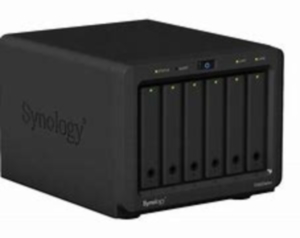
In that respect, the best in their class would be the Synology NAS.
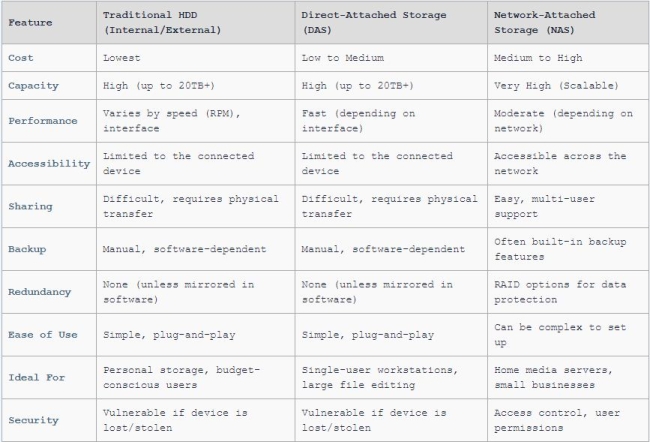
The Ultimate Showdown: HDD vs. DAS vs. NAS
All you have to do is setup a network and external access to your NAS and you will be able to safely access your data from anywhere in the world. You can also download apps from the NAS on your phone that will make your life even easier.
The setup saves you time and allows you for instance to :
- Sync the retouched photos to your Synology.
- Run a website
- Create a totally separated part on your NAS (which contains all the data for that client with access and permission to upload materials).
As you can see, a Synology NAS is an eco system of its own. It that can help you operate your home, your business and provides more than storage space. So if you’re looking for a reliable backup solution, then a NAS might just be what you are looking for.
That being said, Synology just released the diskstation DS923+ which is a brand new NAS created for anyone that uses the system for photography/video and music creation and that lets you extend the system with extra bays/NAS units.
Since NAS/DAS or even a hard drive is something you store valuable information on, here are some very simple tips :
- Do not forget to clean the fans every months which implies powering down your PC/Mac/NAS and opening up the case once a year in order to clean the inside.
- Do not keep the system running if you only use it on the weekends ! Granted, it was designed to run for months and years but if you find the time scheduler in the system, just turn it off now and then.
To help you visualize the strengths and weaknesses of each option, we’ve compiled a detailed comparison table:
Diving Deeper into Storage Backup : Key Considerations
Beyond the table, let’s delve into specific scenarios:
- Budget-Conscious Users: A traditional internal or external HDD is often the most economical choice for basic storage needs.
- Performance-Hungry Professionals: DAS solutions, particularly those with Thunderbolt interfaces, offer the speed required for demanding tasks like video editing.
- Collaborative Environments: NAS devices excel in environments where multiple users need to access and share files, offering centralized storage and user management features.
- Data Redundancy and Backup: While all options require a backup strategy, NAS devices often provide built-in solutions like RAID (Redundant Array of Independent Disks) and automated backup software, offering enhanced data protection.
Storage Backup Use Case Scenarios
Here are some practical scenarios to consider:
Scenario 1: Personal Photo Archive: For storing your ever-growing photo collection, an external HDD offers a cost-effective solution. We recommend:
Regularly backing up the drive to a cloud service or another physical drive.
Organizing the photos into folders by date or event.
Scenario 2: Video Editing Workstation: A DAS with a fast interface (Thunderbolt) is crucial for editing large video files. We recommend:
Using the DAS as a primary working drive and backing up finished projects to a separate backup drive or NAS.
Optimizing the file system for video editing (e.g., using APFS on macOS).
Scenario 3: Small Business File Server: A NAS device provides centralized storage and access control for all employees. We recommend:
Configuring RAID for data redundancy in case of drive failure.
Setting up user accounts with appropriate permissions.
Implementing a regular backup schedule to an offsite location or cloud service.
Storage in 2025 and Beyond
Looking ahead, we anticipate several key trends shaping the future of data storage:
- SSD Domination: Solid-state drives (SSDs) are steadily replacing traditional HDDs in many applications due to their speed, durability, and energy efficiency. We expect SSDs to become increasingly prevalent in DAS and even NAS solutions.
- Cloud Integration: NAS devices will continue to integrate more seamlessly with cloud storage services, offering hybrid solutions that combine local performance with offsite backup and accessibility. This means:
- More sophisticated automatic syncing options.
- Easier ways to create offsite backup locations.
- Improved collaborative features.
- AI-Powered Storage Management: Artificial intelligence (AI) will play a growing role in optimizing storage performance, predicting potential failures, and automating data management tasks.
- Increased Capacity and Speed: Expect continued advancements in storage capacity and transfer speeds across all storage options. New interfaces like USB4 and Thunderbolt 5 will push the boundaries of DAS performance.
Choosing the Right Path To Backup Your Data
The “best” storage solution ultimately depends on your individual needs and budget. Traditional hard drives remain a viable option for basic storage, DAS delivers speed for single-user workstations, and NAS provides centralized storage and collaboration features. As we look to 2025 and beyond, embrace the evolution of storage technologies – SSDs, cloud integration, and AI-powered management – to build a robust and future-proof data fortress. By carefully evaluating your requirements and staying informed about emerging trends, you can confidently navigate the ever-evolving landscape of data storage and ensure the safety and accessibility of your valuable information.