
Are you tired of sacrificing visual fidelity for smooth gameplay? Do you crave stunning graphics without crippling your frame rates? If so, NVIDIA’s Deep Learning Super Sampling (DLSS) might be the answer you’ve been searching for. In this guide, we’ll explore how DLSS leverages the power of artificial intelligence to revolutionize gaming visuals, delivering sharper images and higher frame rates.
What is Deep Learning Super Sampling (DLSS)?
Deep Learning Super Sampling, or DLSS, is an image upscaling technology developed by NVIDIA that uses deep learning to increase the performance of games, particularly those that are graphically demanding. It essentially allows you to run games at a lower internal resolution and then use AI to upscale theimage to a higher resolution, like 4K. But, this isn’t just a simple resolution stretch. DLSS aims to produce images that are comparable to, and sometimeseven superior to, native resolution rendering, but with a significant performance boost.
The core idea behind DLSS is to train a deep neural network on high-resolution, high-quality images. This network then learns to predict how a lower-resolution image should look when upscaled to a higher resolution. When you play a game with DLSS enabled, the game renders at a lower resolution, and the DLSS network uses its training to intelligently upscale the image, filling in the missing details and creating a sharper, more visually appealing final image.
How Does DLSS Work? A Deeper Dive
DLSS operates through a multi-stage process involving both offline training and real-time inference:
- Offline Training: NVIDIA trains a deep neural network using super-resolution techniques. The network is fed with vast datasets of high-resolution images (often rendered offline with super-sampling) and their corresponding lower-resolution counterparts. This training allows the network to learn the optimal way to reconstruct fine details and create visually pleasing upscaled images.
- Real-Time Inference: When you enable DLSS in a game, the game engine feeds the lower-resolution image to the trained neural network. The network, running on the Tensor Cores of NVIDIA RTX GPUs, then performs the upscaling process in real-time. It analyzes the input image and uses its learned knowledge topredict the high-resolution output.
- Temporal Feedback: Modern versions of DLSS, like DLSS 3 and beyond, often incorporate temporal feedback. This means the network also considers information from previous frames to stabilize the image and reduce ghosting artifacts. This is crucial for maintaining visual stability during fast-paced action.
Benefits of Using DLSS
DLSS offers a range of benefits that can significantly enhance your gaming experience:
- Increased Frame Rates: By rendering the game at a lower resolution and then upscaling, DLSS can dramatically increase frame rates, often by 50% or more.
- This allows you to play games at higher settings or resolutions without sacrificing performance.
- Improved Image Quality: Contrary to initial concerns, DLSS can, in many cases, provide image quality that is comparable to, or even better than, native resolution rendering. The AI algorithms are adept at reconstructing details and reducing aliasing artifacts.
- Smoother Gameplay: Higher frame rates translate to smoother gameplay, reducing input lag and improving responsiveness. This is especially important for competitive gamers.
- Extended GPU Lifespan: By reducing the load on your GPU, DLSS can potentially extend its lifespan, as it’s not working as hard to render each frame.
DLSS vs. Traditional Upscaling Methods
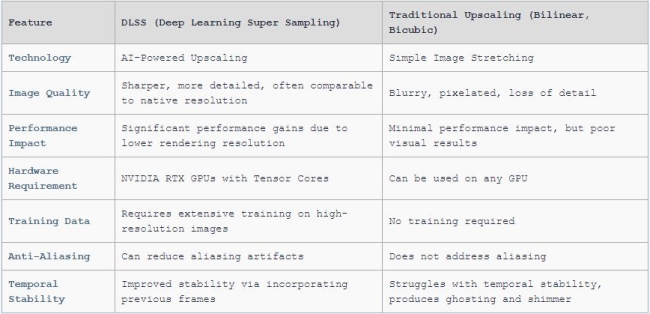
Traditional upscaling methods, such as bilinear or bicubic scaling, simply stretch the image without adding any new detail. This often results in blurry or pixelated images, especially at higher scaling factors. DLSS, on the other hand, uses AI to intelligently reconstruct the image, adding details and sharpening textures. This results in a much cleaner and more visually appealing image.
Here’s a comparison table to illustrate the key differences:
DLSS 3 and Beyond: What’s New?
DLSS has evolved significantly since its initial release. DLSS 3 introduced Frame Generation, which uses AI to generate entirely new frames, further boosting performance. This technology analyzes sequential frames and motion vectors to create intermediate frames, effectively doubling or even tripling frame rates in some scenarios.
Subsequent iterations of DLSS have focused on refining the AI algorithms, improving image quality, and expanding compatibility with different games and hardware configurations. We can expect future versions of DLSS to continue pushing the boundaries of AI-powered image upscaling, with even more impressive performance gains and visual enhancements.
How to Enable DLSS in Your Games
Enabling DLSS is typically straightforward. Within the graphics settings of supported games, you should find a DLSS option. You can then select from different quality presets, such as:
- Quality: Prioritizes image quality over performance.
- Balanced: A good compromise between image quality and performance.
- Performance: Prioritizes performance over image quality.
- Ultra Performance: Delivers the highest performance gains, but may result in some image quality degradation.
Experimenting with different presets is recommended to find the best balance for your specific hardware and preferences.
Is DLSS Right for You?
DLSS is a powerful tool for improving gaming performance and image quality. It’s particularly beneficial if you:
- Own an NVIDIA RTX GPU.
- Want to play graphically demanding games at higher resolutions or settings.
- Struggle to maintain stable frame rates in your favorite games.
- Want to improve the visual quality of your games without sacrificing performance.
The Future of DLSS
The future of DLSS looks bright. As AI technology continues to advance, we can expect even more impressive performance gains and visual enhancements.
NVIDIA is likely to continue refining the algorithms and expanding compatibility to more games and hardware configurations. DLSS is poised to become an even more essential technology for gamers who demand the best possible visual experience.
In conclusion, NVIDIA’s DLSS is a game-changing technology that utilizes the power of deep learning to enhance image quality and boost frame rates. By leveraging AI to intelligently upscale images, DLSS delivers a superior visual experience without compromising performance. If you’re looking to maximize the potential of your NVIDIA RTX GPU, DLSS is definitely worth exploring.